Test whether your staff fall for the lure
Read in OpenCTI the lure an attacker sent, rebuild it as an OpenAEV phishing exercise, with XTM One drafting it if you wish, and see who opened, clicked and typed a password.
At the end of this journey, your staff have received a copy of the lure an attacker really sent, and you know, person by person, who opened it, who followed its link and who typed their credentials, so you train the ones who did. OpenCTI tells you what the lure looked like, OpenAEV sends it and scores every step, and XTM One can draft the email and the page. The awareness manager drives it; the steps below are the pages to follow, in order.
- Lure known → Lure email written: what it said
- Drafts generated → Lure email written: draft
- Drafts generated → Landing page built: draft
- Lure email written → Lure sent: email template
- Landing page built → Lure sent: phishing action
- Lure sent → Who fell for it: each person's steps
Who takes part
- The exercise planner, here the security awareness manager, drives the journey from the second step: they build the email and the page, send the exercise and read the results.
- The CTI analyst reads in OpenCTI what the lure looked like and where it landed, at the first step, and hands that story to the planner.
- The SOC manager reads the results beside the planner, and counts the reports the security operations center (SOC) received during the exercise: OpenAEV does not record them.
- The staff who receive the lure, such as the front-desk teams, do not know about the exercise until the page they land on tells them.
Why it spans several modules
A lure that works is one your staff have already met. OpenCTI knows it: the report that describes the campaign, and the sightings of what reached your organization. See Explore entities.
OpenAEV turns it into an exercise on your own people. It sends each person their own email with their own link, hosts the landing page, and scores three steps for each person: opened, clicked, submitted. See How a phishing exercise works.
No connector carries a lure from OpenCTI to a phishing exercise: you read it in OpenCTI and write it again in OpenAEV, with a link in place of the attachment. XTM One shortens that work: its agents write the email and the page from your instructions, in the editors of OpenAEV. See XTM One in OpenAEV. Without OpenCTI, you test a generic lure, which tells you less about the attack your staff will really receive.
What you need
- OpenCTI, with the report and the sightings of the campaign. Reading them takes the Access knowledge capability.
- OpenAEV, any edition: phishing exercises are part of every edition. The platform sends email, and your staff can open its address from where they read their email. See Before the first exercise.
- The staff to reach, as persons in teams, each with an email address. See Organize the people your injects target.
- In OpenAEV, the planner has Manage phishing to build the email and the page, Manage assessment to add the inject and Launch assessment to send it. Reading the results takes Access assessment, and the captured credentials Access findings.
- For the XTM One step only: the Enterprise Edition, OpenAEV connected to XTM One, and the Filigran AI Terms accepted by someone with Manage platform settings. See Connect the modules to each other.
- The authorization your organization requires to run a phishing exercise on its staff, obtained before you send anything.
How it unfolds
Grand Meridian Hotels wants to know whether its front desks would fall again for the lure Velvet Harbor sent in January 2026.
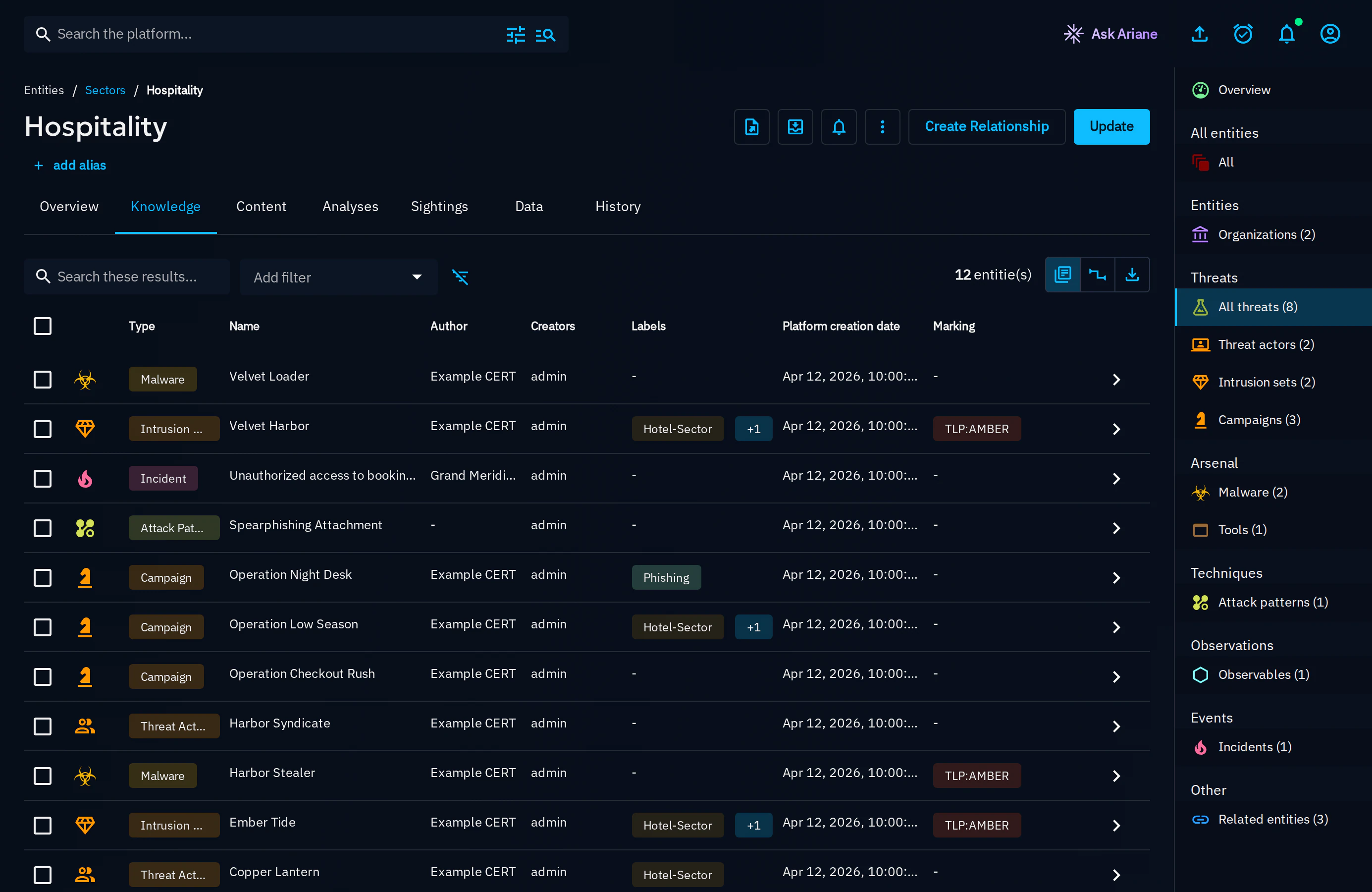
Know the lure. In OpenCTI, the CTI analyst opens the organization Grand Meridian Hotels and its Sightings tab. The event European Hospitality Summit 2026 was seen 4 times from 5 to 8 January: the booking requests that named it reached the front desk. Example CERT's report Fake booking requests reach hotel front desks describes the campaign. The analyst hands the planner the story: a group booking for the summit, sent to the front desk (Know the lure from OpenCTI).
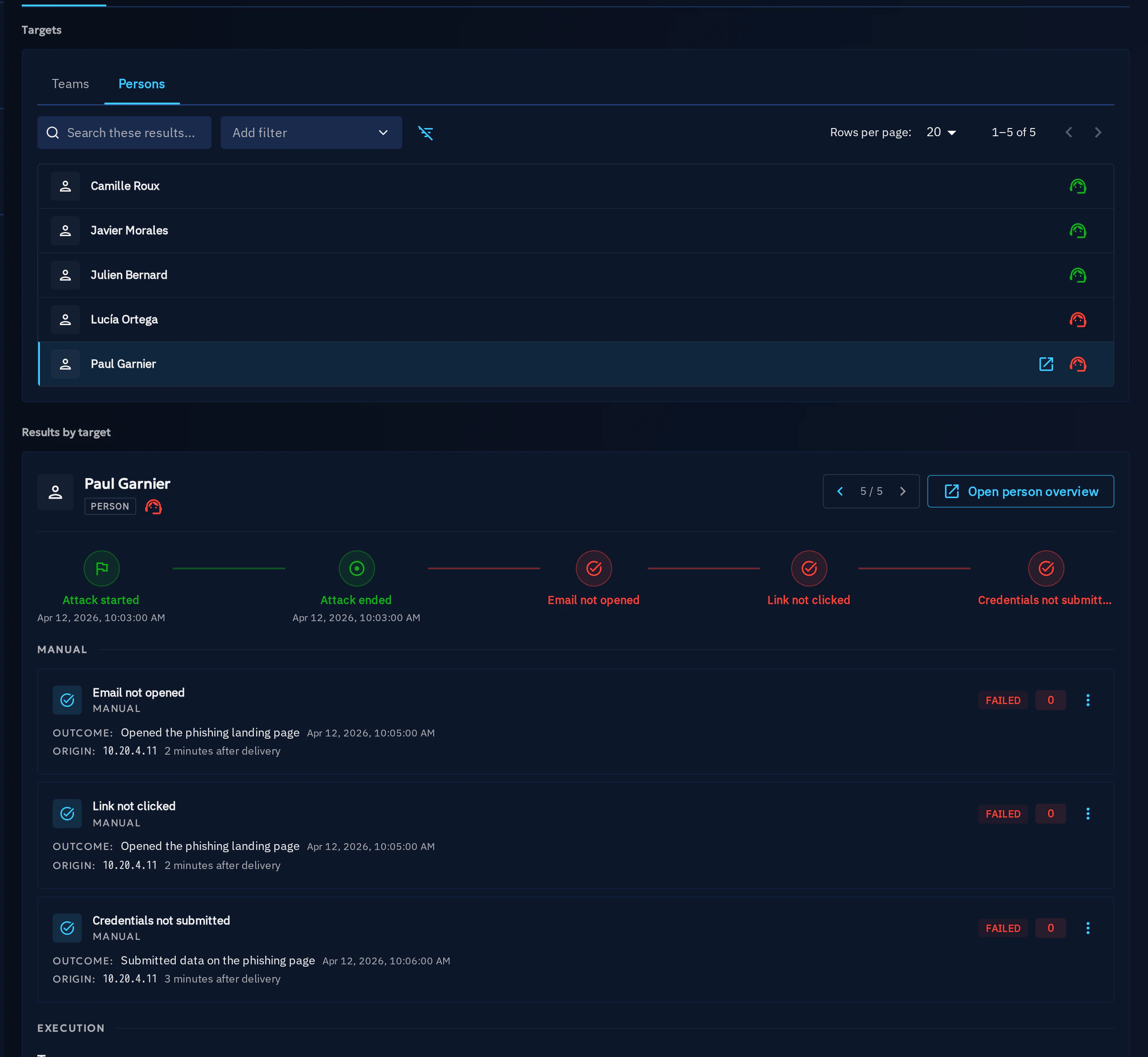
Understand what is measured. The awareness manager reads how an exercise scores each person: Email not opened, Link not clicked and Credentials not submitted, green while the person resists, red once they fall for the step (Understand a phishing exercise).
Rebuild the lure. The manager writes the email template EHS 2026 group booking request, sent by EHS 2026 Delegate Services, with each person's link in place of the attachment (Write the lure email). They build the landing page EHS 2026 booking portal: a sign-in form that keeps the user name and never the password, then redirects to the intranet page that explains the exercise (Build the landing page). With XTM One, Generate with AI drafts both from a preset such as Match a specific brand, and nothing reaches the form until the manager accepts it (Let XTM One draft them).
Send it. In the scenario Front-desk phishing, the manager adds the inject Fake EHS 2026 group booking, from the action Phishing: EHS 2026 booking portal, to the teams Front desk France and Front desk Spain, 5 people. No email security platform reports to OpenAEV yet, so the manager removes Detection and Prevention. They try it on a test team with an atomic test first. On 12 April 2026, Execution details reads Phishing emails sent to 5 target(s) (Send it to your teams).
Read who fell for it. Four people opened the email, two followed the link, one submitted the form: Paul Garnier, the night auditor of the Paris hotel, 3 minutes after delivery, from his front-desk workstation. His Credentials finding holds the shared account night.audit, without the password. Javier Morales never opened it (Read who clicked).
Train and test again. Paul Garnier already landed on the page that explains the exercise. The CISO moves the shared night.audit account to personal accounts, and connects the Meridian email gateway to OpenAEV, so the next exercise also measures whether the gateway caught the lure. After the awareness session, the manager sends the exercise again and compares.
The steps
Each step opens its page; the first one starts the journey, and every page of it then shows where you are.
- 1OpenCTIOpenCTIKnow the lure from OpenCTIExplore entities · 12 minSee which threats target a sector, an organization, a person, a system or an event in the OpenCTI Entities menu, what was seen there, and how far to trust a source.
- 2OpenAEVOpenAEVUnderstand a phishing exerciseHow a phishing exercise works · 5 minWhat an OpenAEV phishing exercise measures, the landing pages and lure emails it is built from, how each person's open, click and submission is scored, and what it needs.
- 3OpenAEVOpenAEVWrite the lure emailWrite the lure email of a phishing exercise · 5 minCreate the email a phishing exercise sends, place each person's link with {{phishing_url}}, choose its sender and tracking pixel, and check it in the preview.
- 4OpenAEVOpenAEVBuild the landing pageBuild the landing page of a phishing exercise · 6 minCreate the page a phishing link opens, write its sign-in form, choose what OpenAEV keeps of a submission, and use it as a Threat Arsenal action.
- 5XTM OneXTM OneLet XTM One draft themXTM One in OpenAEV · 11 minWhat XTM One does in OpenAEV, from Ask Ariane to generated TTPs, detection rules, phishing pages and autonomous attacks, with whose rights an agent works, and what each edition brings.
- 6OpenAEVOpenAEVSend it to your teamsSend a phishing exercise to your teams · 6 minAdd a landing page's phishing action to a simulation, choose the email and the teams, try it on yourself with an atomic test, and check that every email left.
- 7OpenAEVOpenAEVRead who clickedRead who opened, clicked and submitted · 7 minRead the results of a phishing exercise person by person and team by team, tell a person's click from a mail gateway's, and find the credentials it captured.
Where to go next
- Rehearse a cyber crisis with the people who would live it: play the rest of the night to the crisis cell, once the lure worked.
- Check your defenses against the threats you track: replay what the lure started on the endpoints, and read what the endpoint detection and response (EDR) tool stopped.
- How an attack becomes injects and expectations: how the phishing steps and their validation rules score a team.
- Use your own domain for phishing links: send the links from a host that looks like the real one.