# Build the landing page of a phishing exercise

> Create the page a phishing link opens, write its sign-in form, choose what OpenAEV keeps of a submission, and use it as a Threat Arsenal action.

- URL: https://filigran.io/docs/openaev/use/phishing/landing-pages/
- Products: OpenAEV 3.261118.0
- For: crisis exercise planners, security validation engineers
- Type: How-to guide

A landing page is the page a person sees after clicking the link of a phishing email, most often a sign-in form that asks for their credentials. You build it once in OpenAEV and reuse it in every exercise. Creating it also creates the Threat Arsenal action you add to a simulation, so the landing page is where a phishing inject starts. If you are new to phishing exercises, read [How a phishing exercise works](https://filigran.io/docs/openaev/use/phishing/) first.

## Before you start {#before-you-start}

- Your role has **Manage phishing**. Deleting a landing page takes **Delete phishing**.
- To serve the page on a hostname of your own, the hostname is verified first: see [Use your own domain for phishing links](https://filigran.io/docs/openaev/use/phishing/custom-domains/).

## Create the landing page {#create-the-landing-page}

1. Open **Components > Phishing**. The **Pages** tab lists the landing pages.
2. Click **Create**. The editor opens with the form on the left and a **Preview** on the right.
3. Under **Details**, give the page a **Name**. The Threat Arsenal action takes it, as **Phishing:** followed by the name, so pick one you will recognize in the picker.
4. Add a **Description** if you want one: the list shows it.
5. In **Redirect URL after submit**, enter where the person goes once they submit the form, for example your awareness page. Leave it empty to keep them on the landing page. Only a relative path or an `http` or `https` address is accepted.
6. In **Serve on domain**, keep **Platform default domain**, or choose one of your verified custom domains. The links of the emails are built on that host.
7. Choose what OpenAEV keeps of a submission with **Capture submitted data** and **Capture passwords** (see [Choose what a submission keeps](#choose-what-a-submission-keeps)). Both are on for a new page.
8. Under **Landing page content**, write the page in **HTML content**, and its style in **CSS content**. The **Preview** shows it as people will see it; its fullscreen button shows it at full size.
9. Click **Create**. The page of the landing page opens.

**Diagram: When a person submits the landing page's form, OpenAEV scores the step, keeps what the capture settings allow, and sends them to the redirect URL**

- The person: Link in the email (Their own token), Landing page form (Scripts removed)
- OpenAEV: Submission (Named fields read)
- Results: Credentials not submitted (Turns red), Credentials finding (If Capture submitted data is on; the password only with Capture passwords)
- Afterwards: Redirect URL (Or stays on the page)

Connections:

- Link in the email → Landing page form: opens
- Landing page form → Submission: submit
- Submission → Credentials not submitted: scores
- Submission → Credentials finding: user name, maybe password
- Submission → Redirect URL: then

![The editor of the landing page EHS 2026 booking portal: its name, description, redirect URL, domain and capture switches on the left, the live preview of the sign-in form on the right, and the HTML content below.](https://filigran.io/docs/shots/929659d0cfced95001457874df732db86d03f9fdbf116df7144e4155749e5da1.webp)

## Write the form {#write-the-form}

OpenAEV catches the submission of any form on the page: you do not wire the form to anything. It reads the form's named fields and records them for the person whose link was opened.

- Give the user name field one of these names, and OpenAEV stores it as the user name: `username`, `email`, `user`, `login`, `loginfmt`, `user_name`, `userid`, `user_id`, `identifier`, `emailaddress`, `e-mail`, `account`.
- Give the password field one of these names: `password`, `passwd`, `pass`, `pwd`, `passwordinput`, `userpassword`.
- When no field name is recognized, for a form copied from a real site, OpenAEV keeps every filled field as `name=value` pairs instead, so a submission is never lost.

The page is shown without its scripts: OpenAEV removes them before display. Build it with HTML and CSS only. A minimal form:

```html
<form>
  <label>Email <input type="email" name="username" required /></label>
  <label>Password <input type="password" name="password" required /></label>
  <button type="submit">Sign in</button>
</form>
```

## Choose what a submission keeps {#choose-what-a-submission-keeps}

| Setting | On | Off |
| --- | --- | --- |
| **Capture submitted data** | The submission becomes a **Credentials** finding, linked to the person, their team and the inject. The Threat Arsenal action declares it as an output, for [chaining injects](https://filigran.io/docs/openaev/use/injects/chaining/) | Only the submission is recorded: the **Credentials not submitted** step turns red and nothing is stored |
| **Capture passwords** | The finding holds the user name and the password, as `user / password` | The finding holds the user name only, and no password is kept |

Keep **Capture passwords** off unless your exercise needs the password: knowing who submitted is enough to score the step.

## Use the page in an exercise {#use-the-page-in-an-exercise}

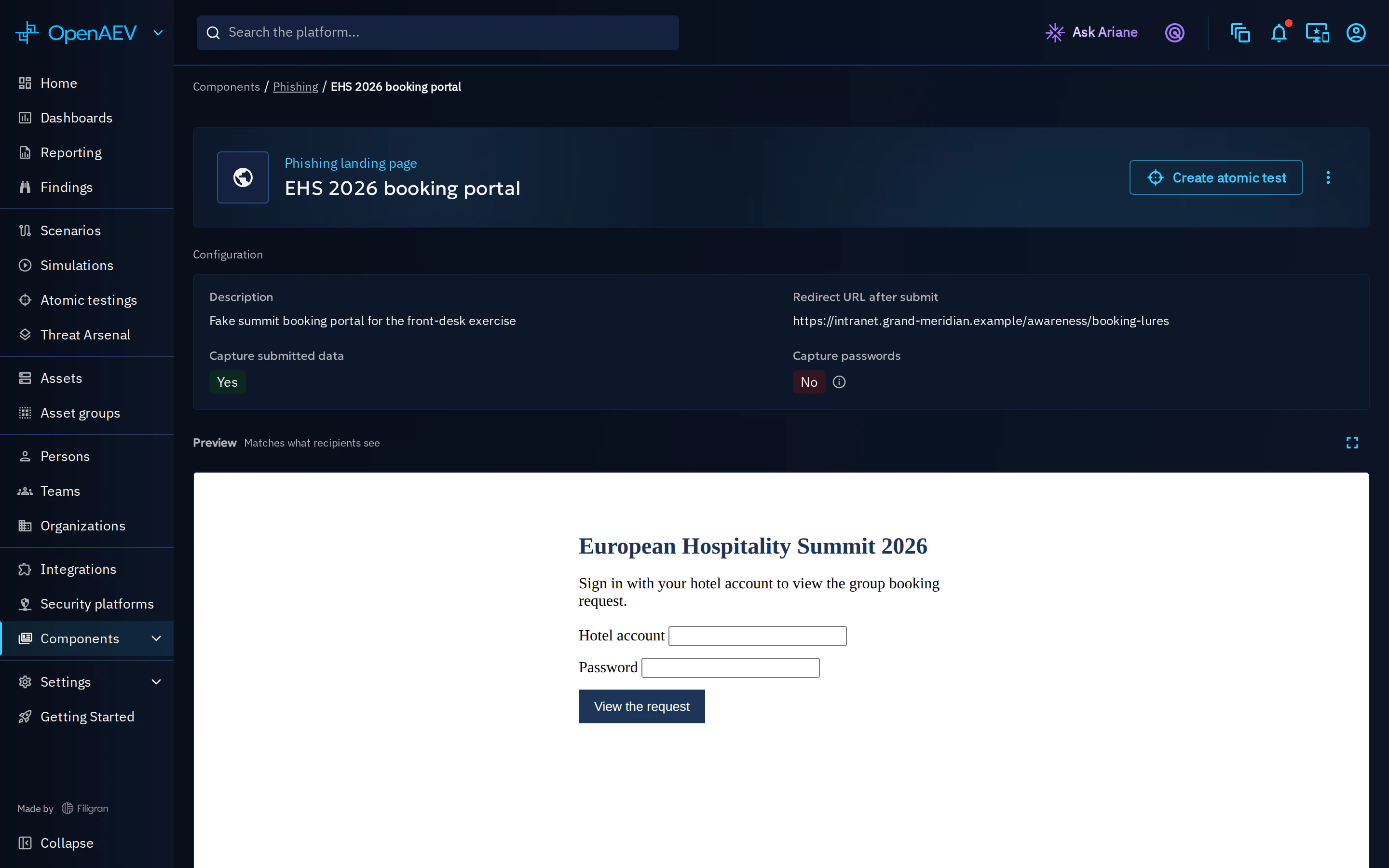
The page of the landing page shows its **Configuration** and its **Preview**. From there:

- **Create atomic test** opens an atomic test already set on this action: the quickest way to send it to a test team. It takes **Manage assessment**.
- In a scenario or simulation, add the action **Phishing:** followed by the page's name, from the Threat Arsenal picker. See [Send a phishing exercise to your teams](https://filigran.io/docs/openaev/use/phishing/run/).
- The actions menu offers **Update**, **Duplicate** and **Delete**.

> **Warning**
>
> Deleting a landing page also deletes its Threat Arsenal action and every inject built on it, in every scenario, simulation and atomic test, with their results and findings. Delete a landing page only when none of its exercises matter any more.

**Example: A fake booking portal for the front desks**

Grand Meridian Hotels wants to know whether its front desks would fall for a lure like the one Velvet Harbor sent on 9 January 2026, a booking request for the European Hospitality Summit 2026. The awareness manager builds the page the link opens: a booking portal that asks for the front-desk account to see the request.

| Field | Value |
| --- | --- |
| **Name** | `EHS 2026 booking portal` |
| **Description** | `Fake summit booking portal for the front-desk exercise` |
| **Redirect URL after submit** | `https://intranet.grand-meridian.example/awareness/booking-lures` |
| **Serve on domain** | `reservations.grand-meridian.example` |
| **Capture submitted data** | On |
| **Capture passwords** | Off |

**HTML content**:

```html
<div class="portal">
  <h1 class="portal-title">European Hospitality Summit 2026</h1>
  <p class="portal-intro">Sign in with your hotel account to view the group booking request.</p>
  <form class="portal-form" method="post">
    <label class="field">Hotel account <input name="username" required /></label>
    <label class="field">Password <input type="password" name="password" required /></label>
    <button type="submit">View the request</button>
  </form>
</div>
```

The Threat Arsenal now holds **Phishing: EHS 2026 booking portal**. A night auditor who signs in with the shared `night.audit` account leaves a **Credentials** finding that reads `night.audit`, with no password, and lands on the intranet page that explains the exercise.

> **With XTM One: Generate the page with XTM One**
>
> With OpenAEV connected to XTM One and an Enterprise Edition license, **Landing page content** shows **Generate with AI**. Choose an AI agent, start from a preset such as **Microsoft 365 sign-in**, **Corporate VPN portal** or **Match a specific brand**, add your own instructions, and the agent writes the HTML and the CSS. When the fields already hold content, it refines them rather than starting over. Nothing reaches the form until you accept the result.
![The page of the landing page EHS 2026 booking portal: what it captures, where it redirects, its preview, and the Create atomic test button that tries it on one target.](https://filigran.io/docs/shots/1ae450e5a4fc534caefe34028b6445b8f02e20c0cd567202d3579a58266c735b.webp)

## What's next {#what-s-next}

- [Write the lure email of a phishing exercise](https://filigran.io/docs/openaev/use/phishing/email-templates/) that links to this page.
- [Send a phishing exercise to your teams](https://filigran.io/docs/openaev/use/phishing/run/).
- [Use your own domain for phishing links](https://filigran.io/docs/openaev/use/phishing/custom-domains/).
