# Write the lure email of a phishing exercise
> Create the email a phishing exercise sends, place each person's link with {{phishing_url}}, choose its sender and tracking pixel, and check it in the preview.
- URL: https://filigran.io/docs/openaev/use/phishing/email-templates/
- Products: OpenAEV 3.261118.0
- For: crisis exercise planners, security validation engineers
- Type: How-to guide
An email template is the lure a phishing exercise sends: its subject, its sender and its body, with the link to the landing page. You write it once and choose it in each phishing inject, with any landing page. This page writes one, places the link, and explains which sender the email goes out with. If you are new to phishing exercises, read [How a phishing exercise works](https://filigran.io/docs/openaev/use/phishing/) first.
## Before you start {#before-you-start}
- Your role has **Manage phishing**. Deleting a template takes **Delete phishing**.
- The address you send from is one your mail server accepts to send, or the email will not leave. The mail server is the one of the platform's configuration.
## Create the email template {#create-the-email-template}
1. Open **Components > Phishing**, then the **Emails** tab.
2. Click **Create**. The editor opens with the form on the left and a **Preview** on the right, which shows the sender and the subject above the body.
3. Under **Details**, give the template a **Name**: the inject's template list shows it. Add a **Description** if you want one.
4. Write the **Subject** of the email.
5. To send from another identity than the platform's, fill in **Sender name override** and **Sender email override** (see [Choose the sender](#choose-the-sender)).
6. Keep **Add tracking pixel** on to measure who opens the email. It is on for a new template.
7. Under **Email content**, write the **HTML body**, with the `{{phishing_url}}` placeholder where the link goes.
8. Optionally, write a **Text body**. The preview shows it when the HTML body is empty.
9. Click **Create**. The page of the template opens, with its **Configuration** and its **Preview**.
**Diagram: For each person, OpenAEV puts their own link in place of the placeholder, adds the tracking pixel and picks the sender before sending**
- Template: HTML body (With {{phishing_url}}), Sender overrides (Inject, then template)
- At sending: Personal link (One token per person), Tracking pixel (If turned on)
- Delivery: Mail server (Platform configuration), Person's mailbox (Their own email)
Connections:
- HTML body → Personal link: placeholder replaced
- Personal link → Tracking pixel: then appended
- Sender overrides → Mail server: from, name, reply-to
- Tracking pixel → Mail server: HTML email
- Mail server → Person's mailbox: delivers
## Place the link {#place-the-link}
When it sends the email, OpenAEV replaces `{{phishing_url}}` with the link of the person it is writing to. Each person has their own link, so their click is theirs. Put the placeholder in a link's `href`, in the visible text, or both:
```html
Hello,
Please confirm the booking request below.
View the booking request
```
A body without the placeholder still gets the link: OpenAEV adds it as a last paragraph, showing the raw address. Nothing else in the body is replaced: OpenAEV sends the HTML as you wrote it, and the [variables](https://filigran.io/docs/openaev/use/components/variables/) of a scenario do not apply to a lure.
The email goes out as HTML. The **Text body** is kept with the template, but the email sent carries the HTML body only.
## Choose the sender {#choose-the-sender}
OpenAEV takes the first value that is set, from the most specific to the most general:
| | Sender address | Sender name |
| --- | --- | --- |
| 1 | **Sender email override** of the inject | **Sender name override** of the inject |
| 2 | **Sender email override** of the template | **Sender name override** of the template |
| 3 | The platform's default sender | The sender name of the simulation |
| 4 | | The platform's default sender name |
The platform's default sender is `openaev.default-mailer` and `openaev.default-mailer-name`, in the [`openaev` block of the configuration](https://filigran.io/docs/reference/openaev/configuration/#openaev); when the platform reads its mailbox over IMAP with a username that is an email address, that address is the sender instead. Replies go to the reply-to addresses of the simulation, or to the platform's default reply-to.
Set the sender on the template when it belongs to the story the email tells, and use the inject's overrides for a one-off variation.
## Decide on the tracking pixel {#decide-on-the-tracking-pixel}
**Add tracking pixel** adds an invisible image at the end of the email. Loading it never turns a step red, because mail gateways and image proxies load images with nobody reading. It only notes on the person's **Email not opened** step, still green, **Email image loaded, open not confirmed** and where the request came from. The step turns red when the person moves on the landing page. Two limits on what the note tells you:
- A mail client that blocks remote images never loads the pixel: the email can be read with no note.
- Mail gateways load images on delivery to inspect them. A hit within 10 seconds of the email or from a known scanner reads **Automated scanner activity detected and ignored** instead, and a hit through an image proxy that also serves real readers, such as Gmail's, is marked **Possibly automated**.
Turn it off when you do not need these notes: the scores stay the same.
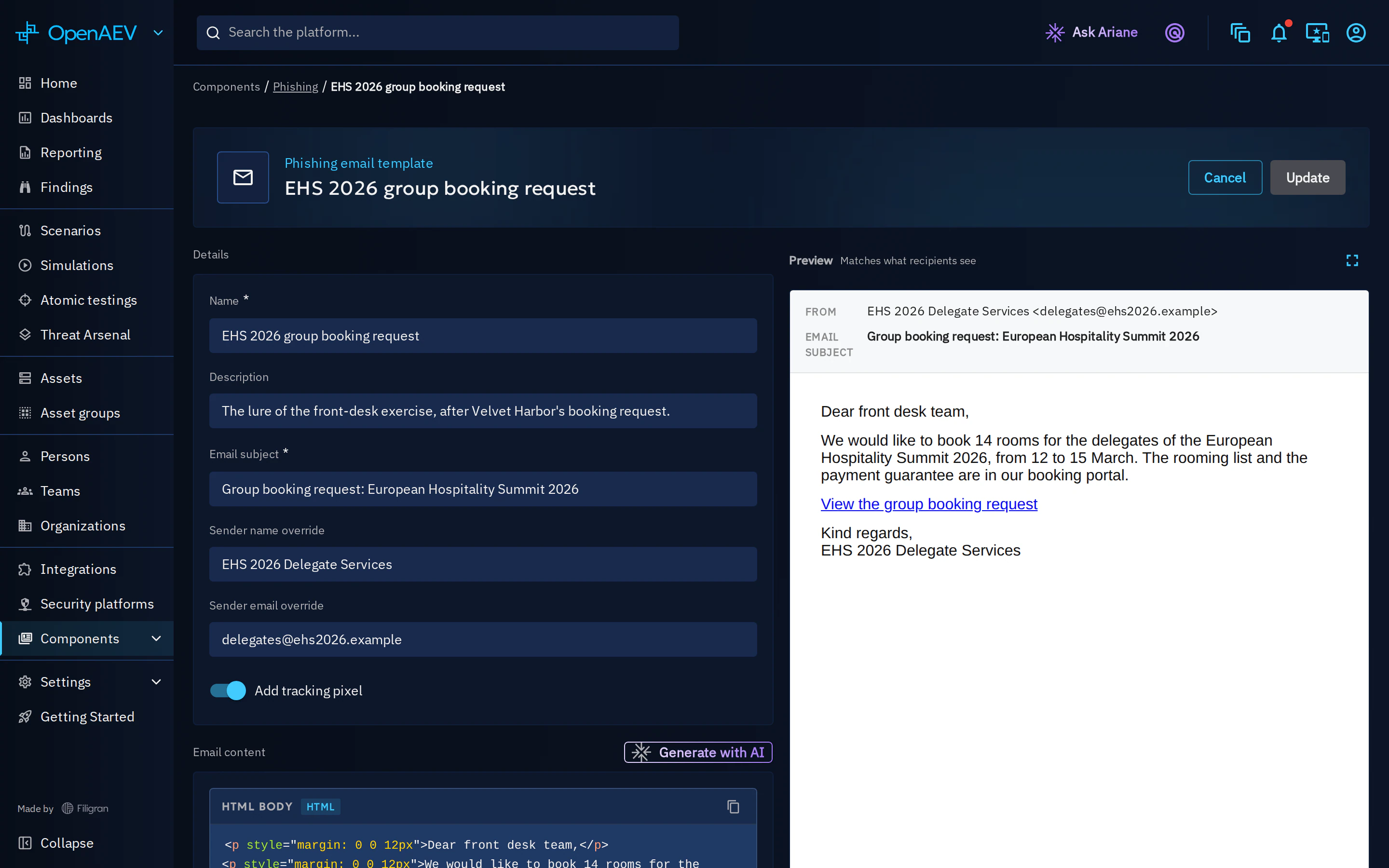
**Example: The fake booking request of the European Hospitality Summit**
Velvet Harbor reached Grand Meridian's night auditor with a booking request for the European Hospitality Summit 2026. The awareness manager writes a lure in the same spirit, with a link instead of an attachment, for the [EHS 2026 booking portal](https://filigran.io/docs/openaev/use/phishing/landing-pages/) landing page.
| Field | Value |
| --- | --- |
| **Name** | `EHS 2026 group booking request` |
| **Subject** | `Group booking request: European Hospitality Summit 2026` |
| **Sender name override** | `EHS 2026 Delegate Services` |
| **Sender email override** | `delegates@ehs2026.example` |
| **Add tracking pixel** | On |
**HTML body**:
```html
Dear front desk team,
We would like to book 14 rooms for the delegates of the European Hospitality Summit 2026,
from 12 to 15 March. The rooming list and the payment guarantee are in our booking portal.
View the group booking request
Kind regards,
EHS 2026 Delegate Services
```
The **Preview** shows `EHS 2026 Delegate Services ` as the sender. Each front-desk person will get this email with their own link to the booking portal.
> **With XTM One: Generate the lure with XTM One**
>
> With OpenAEV connected to XTM One and an Enterprise Edition license, **Email content** shows **Generate with AI**. Choose an AI agent and a preset, such as **Password reset lure**, **Shared document invite** or **Match a specific brand**, or give your own instructions: the agent writes the subject, the HTML body with its `{{phishing_url}}` link, and a text body. Existing content is refined, and nothing reaches the form until you accept it.
## What's next {#what-s-next}
- [Send a phishing exercise to your teams](https://filigran.io/docs/openaev/use/phishing/run/) with this template.
- [Build the landing page of a phishing exercise](https://filigran.io/docs/openaev/use/phishing/landing-pages/) the link opens.
- [Read who opened, clicked and submitted](https://filigran.io/docs/openaev/use/phishing/results/).